Take control of your
cash flow

Bakaya reads bill-wise outstanding straight from TallyPrime and puts every dealer’s dues, overdue ageing and credit limit on your phone — so you know exactly whose door to knock on today, before the next order goes out on udhaar.

7-day free trial · No card needed · Bakaya only reads from Tally, it never edits your books

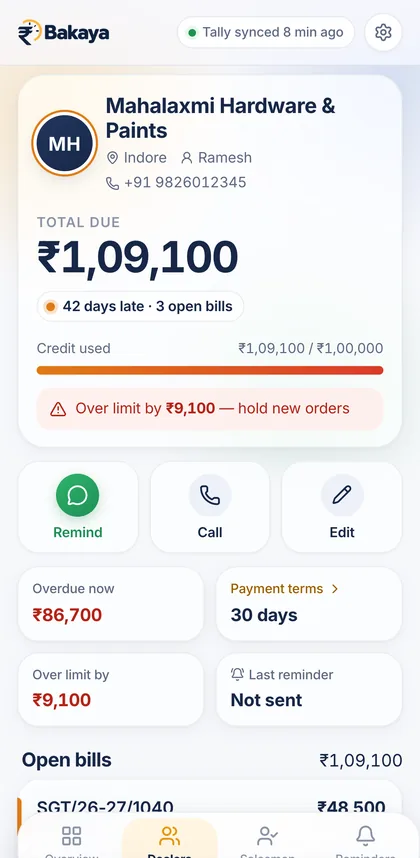
Dealer details screen: ₹1,09,100 due, 42 days late, over credit limit by ₹9,100
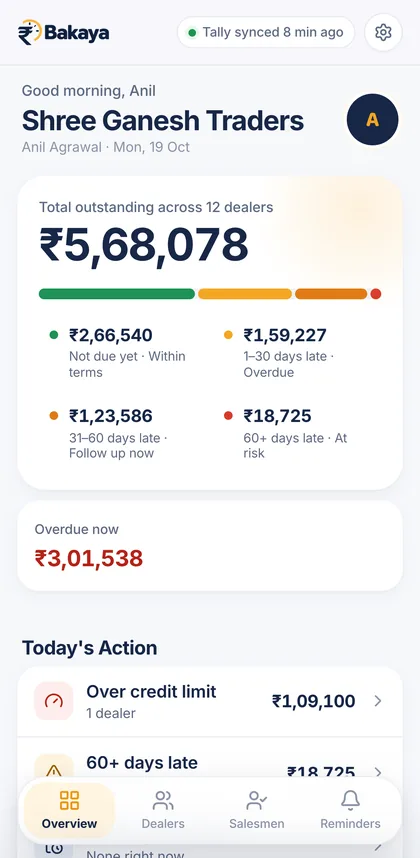
Bakaya overview: total outstanding ₹5,68,078 across 12 dealers, split by ageing, with ₹3,01,538 overdue
  • TallyPrimeBill-wise outstanding, synced by the Bakaya Agent
  • Phone or browserYour dues wherever you are, not just at the Tally PC
  • ₹999 / yearOne simple plan after a 7-day free trial

Product film · 45 seconds

From Tally to your pocket.

Real screens from the Bakaya app — outstanding, ageing, credit limits and the Tally connection — in under a minute.

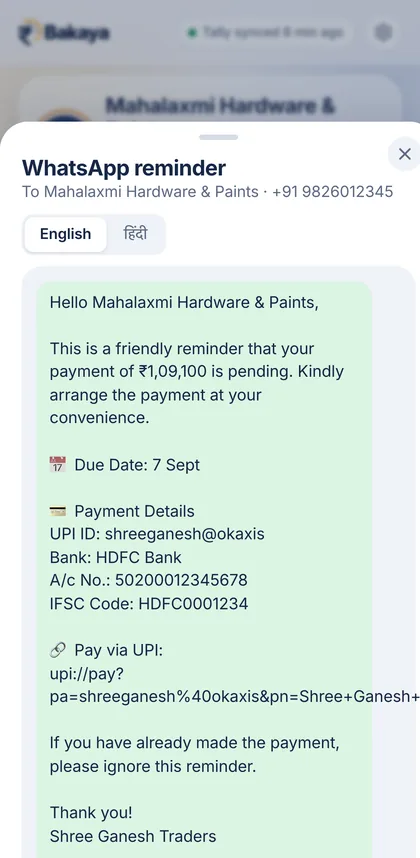
The film shows the Bakaya overview with total outstanding counting up, the ageing breakdown from not-due to 60+ days late, a dealer over their credit limit, the WhatsApp reminder preview, and the Tally connection in Settings, ending on the Bakaya logo. It has no voice-over.

Why Bakaya

Your Tally already knows who owes you.
Bakaya makes it impossible to miss.

Available

Connected to TallyPrime

The Bakaya Agent runs on the PC with TallyPrime. It reads bill-wise outstanding over the PC’s own connection to Tally and sends it to Bakaya over HTTPS. Tally’s port is never opened to the internet.

  • Pair once with a one-time code
  • Checks in about every 30 seconds, tap Sync now any time
  • See the last synced data even when the Tally PC is off
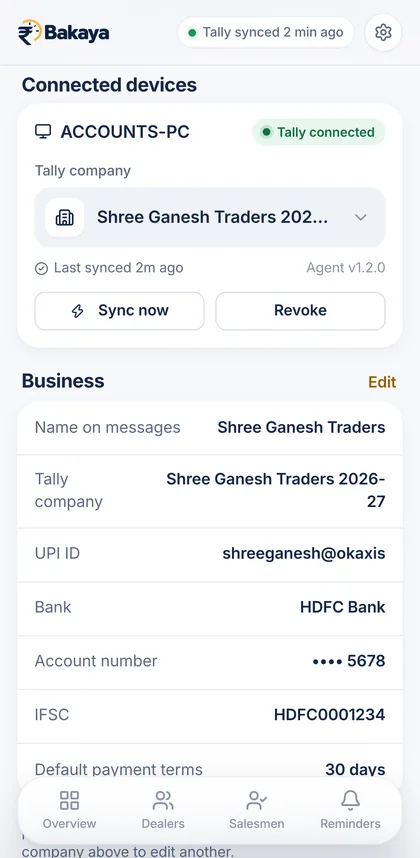
Connected devices: ACCOUNTS-PC, Tally connected, last synced 4 minutes ago, with Sync now and Revoke buttons
Available

Every dealer, one number

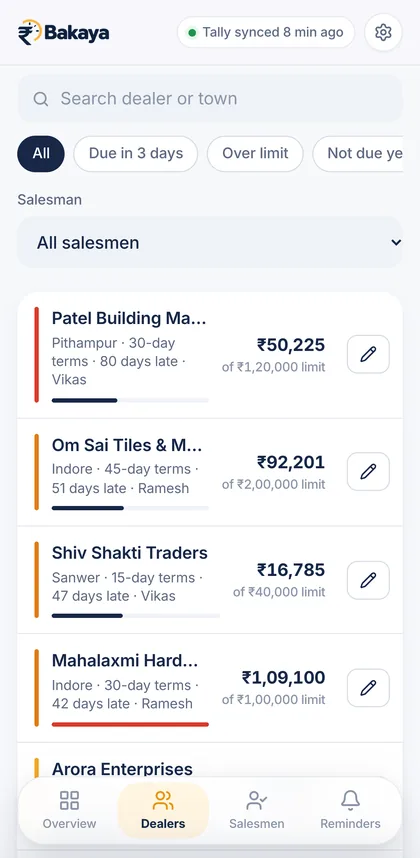
Total outstanding across all dealers at the top, then each dealer with their dues, terms, salesman and days late. Search by name or town and filter by Due in 3 days, Over limit or Not due.

Available

Overdue ageing at a glance

Dues split into not due, 1–30, 31–60 and 60+ days late, counted from each bill’s due date and the dealer’s payment terms.

Available

Credit-limit alerts

Dealers who cross their limit are flagged on the overview and on their page, with how far over they are — before you dispatch the next order.

Over limit by ₹9,100 — hold new orders

Coming soon WhatsApp alert to you when a dealer crosses their limit

Available

Salesman visibility

Assign dealers to salesmen and see each salesman’s party outstanding and overdue. Share a salesman’s outstanding report as an image or PDF.

Coming soon Daily due list sent to each salesman

Onboarding guide

Set up in three steps.

No changes to how you use Tally. Your accountant keeps working, Bakaya reads alongside.

  1. Install the Bakaya Agent on your Tally PC

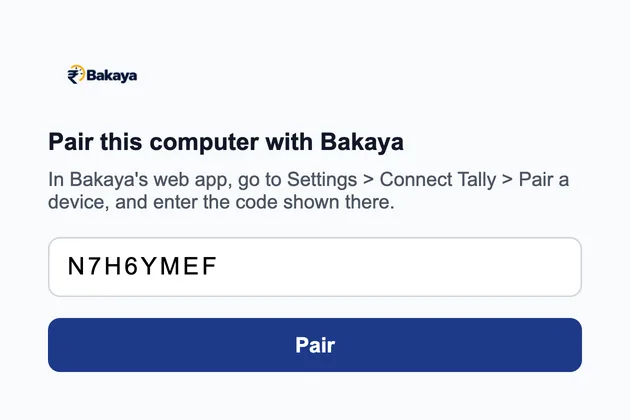
    On the Windows PC that runs TallyPrime, install and open the Bakaya Agent. It sits in the system tray and asks for a pairing code.

    Bakaya Agent window on Windows: Pair this computer with Bakaya, with a code field and Pair button
  2. Pair securely with a one-time code

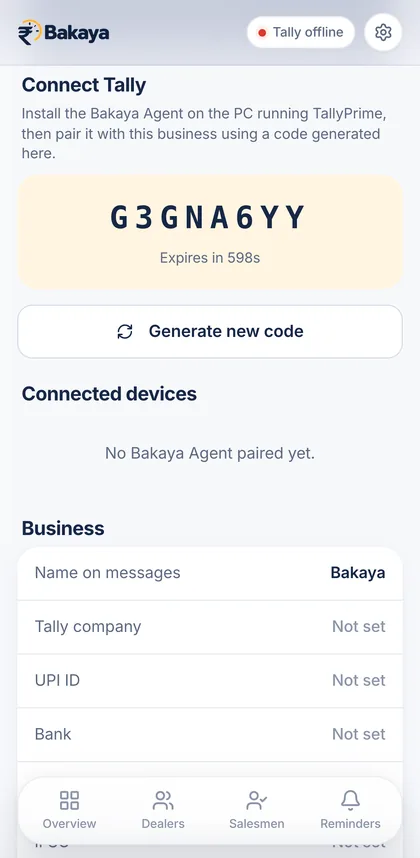
    In Bakaya, open Settings → Connect Tally and generate a code. Type it into the agent. The code expires in 10 minutes and works once.

    Connect Tally screen showing a one-time pairing code that expires in 598 seconds
  3. See your outstanding on mobile or web

    Open TallyPrime and pick your company. After the first sync, every dealer’s dues and ageing are in Bakaya — on your phone or in any browser.

    Dealers list synced from Tally, each with outstanding, credit limit and days late

Product walkthrough

A morning with Bakaya.

Overview with total outstanding, ageing split and overdue amount

Features

What’s in Bakaya today — and what’s next.

Available now

  • TallyPrime sync via the Bakaya Agent on Windows, with Sync now
  • Multiple Tally companies — switch the company you’re viewing, each keeps its own name and payment details
  • Dealer list with search, salesman filter and quick filters
  • Bill-wise view — bill number, bill date, due date and days late
  • Overdue ageing — not due, 1–30, 31–60, 60+ days
  • Credit limits with over-limit flags
  • Payment terms per dealer, plus a default for new dealers
  • WhatsApp reminders in English and Hindi, sent from your WhatsApp
  • Salesmen — assign dealers, see their outstanding, share a report as image or PDF
  • Connected devices — see the paired PC’s status, revoke it any time
  • Mobile number + OTP login, no passwords

On the roadmap

  • Automatic reminders before the due date and every few days once late
  • Stop reminders automatically when payment is recorded in Tally
  • WhatsApp alert to you when a dealer crosses their credit limit
  • Daily due list for salesmen, each seeing only their own dealers

Roadmap items aren’t part of the plan yet. We’ll announce them when they ship — no surprise charges.

Pricing

One plan. Simple, yearly.

Try everything free for 7 days. Keep going for ₹999 a year.

Bakaya Yearly

₹999/ year

About ₹83 a month, billed yearly

Start your 7-day free trial

No card needed to start the trial.

Everything that’s available today:

  • One Bakaya account, on phone and web
  • One connected Tally PC running the Bakaya Agent
  • Switch between the Tally companies on that PC
  • Dealer outstanding, bill-wise view and overdue ageing
  • Credit limits and payment terms
  • Salesmen and shareable salesman reports
  • WhatsApp reminders in English and Hindi
  • Email support

How the trial works

  1. Day 1 — sign up with your mobile number and connect Tally.
  2. Days 1–7 — use every available feature with your real data.
  3. Day 7 — the trial ends. Subscribe for ₹999/year to keep using Bakaya.

FAQ

Questions, answered.

Something else? Email support@bakaya.co.in.

What do I need on the Tally side?

TallyPrime running on a Windows PC, with its connectivity (HTTP/XML server, usually port 9000) turned on in F1 Help → Settings → Connectivity. Bakaya uses bill-wise outstanding, so bill-wise details should be maintained for your party ledgers. During setup you also load a small Bakaya TDL file in TallyPrime so the agent can read bill-wise data — the setup steps walk you through it.

How long does setup take?

Setup is three steps: install the Bakaya Agent on the Tally PC, enter the pairing code from Bakaya, and pick your Tally company. You don’t need to re-enter dealers or bills — they come from Tally on the first sync.

How does data syncing work? Is it live?

The agent checks in with Bakaya about every 30 seconds while the PC and TallyPrime are open, and syncs on its own schedule. Tap Sync now to pull the latest right away. If the Tally PC is off, Bakaya shows the last synced data and tells you when it was synced.

We have more than one company in Tally. Does that work?

Yes. The agent reports the companies open in TallyPrime on that PC, and you choose which one Bakaya shows in Settings → Connect Tally. Switch any time. Each company keeps its own name and UPI/bank details for reminder messages. One Tally PC can be connected to an account at a time.

Does Bakaya change anything in my Tally data?

No. Bakaya only reads outstanding data from Tally. Edits you make in Bakaya, such as a dealer’s phone number or payment terms, stay in Bakaya and are kept on the next sync.

Is my data secure?

TallyPrime’s port is never opened to the internet — the agent talks to Tally on the same PC and connects out to Bakaya over HTTPS. Each paired PC gets its own device credential, stored only as a hash, and you can revoke it from Settings at any time. You sign in with your mobile number and a one-time password, there’s no password to leak.

Does Bakaya send WhatsApp messages on its own?

Not today. Bakaya prepares the message and opens it in WhatsApp, you review it and press send from your own number. Automatic reminders are on the roadmap.

What does the subscription cost and include?

₹999 a year after a 7-day free trial. It includes every feature marked “Available” on this page, for one account and one connected Tally PC. No card is needed to start the trial.

How do I cancel?

During the trial, simply don’t subscribe — nothing is charged. You can delete your account any time from Settings → Account, which removes your business data from Bakaya. For anything about a paid subscription, email support@bakaya.co.in.

Paisa time pe. Tension khatam.

Connect Tally today and see who owes you before your first call of the morning.

7 days free · then ₹999/year